
Is OTT Rebundling? What Netflix’s Aggregation Move Signals for the Industry
A recent Streaming Media article highlighted a significant shift: Netflix is quietly moving into aggregation, positioning itself not just as a destination for content, but as a hub for other services. The catalyst? A “first-of-its-kind” partnership with French broadcaster TF1, which will bring TF1’s live channels and on-demand content into the Netflix app for users in France.
This deal puts Netflix in a role traditionally played by cable, aggregating third-party content, simplifying access, and locking in audiences. Industry watchers have long predicted a return to bundling in streaming. Few expected Netflix to be the one leading the way.
Streaming was meant to offer freedom and flexibility. But today’s reality often involves juggling multiple apps, overlapping content, and rising subscription costs. For many users, the à la carte model is starting to feel more fragmented than freeing.
Netflix isn’t alone in this approach. Amazon, Apple, and Roku have long offered aggregated content experiences. What sets Netflix apart is its global scale, deeply engaged user base, and ubiquity across Smart TVs and devices. When Netflix moves, the industry pays attention.
For smaller OTT services, the implications are worth watching, but this isn’t necessarily bad news. Discovery is becoming more complex, and the battle to own the subscriber relationship is evolving. But with the right foundation, independent services are well-positioned to stay competitive, whether they remain standalone or choose to also collaborate within aggregated ecosystems.
At Magine Pro, we see this trend reinforcing the need for agility. That might mean offering FAST channels alongside SVOD content to reach broader audiences. It could involve introducing pricing tiers, localising experiences, or distributing through platforms like Amazon Channels while maintaining control of the core service.
This isn’t a return to the old cable bundle, but it is a new chapter, one where simplicity, discoverability, and user experience take centre stage. We see the streaming services that succeed will be those built to adapt.

Attending IBC this year? Drop by Hall 5, Stand D72 to see how we help our partners build flexible, future-ready OTT platforms. You can book a dedicated meeting with the team here for a full demo.
Ready for IBC 2025? What to Ask When Evaluating OTT Platforms
IBC is next month, and for many in the industry, it’s the ideal moment to reflect, reset, and rethink your streaming strategy. Whether you’re launching something new, scaling an existing service, or considering a platform switch, the questions you ask now can define your success for years to come.
With tighter budgets and rising viewer expectations, choosing the right OTT partner is no longer just a technical decision; it’s a strategic one.
At Magine Pro, we’ve helped broadcasters, content owners, and streaming operators around the world build flexible, scalable services across every screen. And if you’re thinking about making a change, our OTT Platform Migration Guide walks you through exactly how simple it can be, with step-by-step timelines, key considerations, and tips for a smooth transition.
We also know how overwhelming it can be to evaluate platforms that often sound (and look) very similar. So here are five essential questions to ask when exploring your options at IBC.
1. Can I make changes to my service without a developer?
Your audience moves fast. You should be able to respond just as quickly. Look for a platform that puts you in control, from metadata and promotions to layout and collections, through an intuitive CMS or operator console.
With Magine Pro’s Console, customers can update content rows, create offers, manage access, and push changes live instantly.
2. How does the platform perform across Smart TVs?
Mobile-first isn’t enough. Big-screen viewing is still dominant, especially in living rooms. Make sure your platform offers a polished, responsive UX across Smart TVs and connected devices.
Magine Pro delivers native Smart TV apps with a lean-back UX that keeps users engaged.
3. Can I launch in new markets without rebuilding my service?
Scaling shouldn’t mean starting over. The right OTT platform will support multiple regions, languages, currencies, and monetisation models.
Magine Pro supports global expansion with a flexible architecture designed for growth.
4. Is the platform easy to operate, not just easy to launch?
Launching is step one. Retaining subscribers and running a smooth operation is where the real work begins. Look for automation features (like dunning, notifications, promo codes), actionable analytics, and simple onboarding tools.
Magine Pro helps operators reduce churn and increase lifetime value with built-in retention tools.
5. Will the team feel like a partner or a vendor?
Tech matters, but so do people. Ask about onboarding, support, and what happens after the contract is signed.
At Magine Pro, we work closely with our customers to help them launch, grow, and adapt, bringing a collaborative mindset and real industry expertise.
 Meet Us at IBC 2025
We’ll be at stand D72 in Hall 5 showcasing our proven OTT platform, demoing our Smart TV-ready streaming services, and walking you through the power of our Console.
If you’re attending IBC and want to explore how we can support your next move, we’d love to talk. Book a meeting or simply drop by the stand. Use the code IBC7357 for a complimentary visitor’s pass to IBC.
Make the Most of the Summer Slowdown: 5 Ways to Optimise Your Streaming Service
While summer doesn’t bring everything to a halt, it often creates just enough breathing room to focus on improvements that tend to get sidelined during busier periods. For streaming operators, it’s a valuable window to refine your platform, boost subscriber engagement, and prepare for the busier autumn and winter months when streaming activity typically climbs.
In this blog, we’re sharing a few practical, quick-win optimisations you can implement now – no heavy development required. Here are five areas to focus on this season, all easily managed through the Magine Pro Console:
1. Tackle Involuntary Churn with Payment Recovery Tools
Churn doesn’t always happen by choice. Failed payments from expired cards or missed renewals can silently erode your subscriber base, especially over the summer months, when people are travelling or distracted.
Magine Pro’s built-in dunning tools automatically trigger payment reminders and retry cycles. Operators can also send card expiry notifications to prompt users before issues arise, helping reduce revenue leakage without lifting a finger.
Want to know where your biggest retention gaps might be? Our Retention Checklist is a quick self-assessment to help you identify opportunities and benchmark against best practices used by Magine Pro customers.
2. Refresh Your Content Discovery Experience
If your homepage feels static or generic, viewers are more likely to lose interest. Seasonal curation and regularly updated rows help keep the service feeling fresh and relevant, even if your actual content library hasn’t changed.
In the Magine Pro Console, you can:
- Create custom content rows
- Curate by theme, genre, artist, or mood
- Set up time-based promotions (e.g. “Summer Picks,” “Holiday Favourites”)
It’s an easy way to make your platform more dynamic, and every update goes live instantly across all devices.
3. Experiment with Promo Codes and Offers
Need to boost signups or re-engage lapsed users? Summer is a great time to test promotional offers and measure what works before peak season returns.
The Console makes it simple to create and manage promo campaigns that:
- Apply discounts as a percentage or fixed amount
- Target specific countries or user types (e.g. new users only)
- Use viral (shared) or unique (one-time-use) codes
- Define duration, validity dates, and even bypass checkout entirely
Whether you’re running a seasonal campaign or an affiliate partnership, you can tailor your offers without touching any code.

4. Audit and Enhance Metadata for Better Searchability
Your metadata does more than just describe content, it powers discoverability and improves the viewing experience, especially on Smart TVs where users often browse by visuals and search queries.
This is an ideal time to:
- Fill in missing fields like title, synopsis, cast, and genre
- Update or add translations for multilingual audiences
- Optimise artwork (poster and 16:9 formats recommended)
- Use custom tags (if configured) to reflect seasonal themes or content types
All of this can be done in the Media & Metadata section of the Console, with changes published to your service in real time.
Better metadata = better engagement. It’s one of the simplest ways to increase time watched and reduce bounce rates.

5. Prepare for What’s Next
Even small operational changes made now can help you scale more effectively in the months ahead. Whether you’re planning a new content drop, entering a new market, or refreshing your onboarding flow.
Now’s a good time to:
- Review your user journey across devices
Especially on Smart TVs, where features like QR code sign-in can reduce friction and improve the user experience. - Enable anonymous viewing
Let viewers explore your content before signing up. It’s a proven way to increase engagement and drive conversions, especially for AVOD or hybrid services. - Build passive conversion funnels
Combine tools like anonymous viewing, time-limited promo codes, and targeted offers to nudge users toward becoming subscribers, all running quietly in the background once set up.
These small steps now mean less scrambling later, and a stronger foundation heading into the year’s busiest months.
Use Summer Strategically – Without Slowing Down
You don’t need to hit pause to make progress. By using this time to fine-tune your platform, you’ll be better positioned to retain subscribers, deliver stronger experiences, and scale smartly into autumn and beyond.
If you’re not yet on Magine Pro, or want to see the Console in action, we’d love to show you. Book a demo or contact the team to learn more.
How to Reduce Churn Fast: 5 Retention Tactics for OTT Platforms
Struggling with subscriber churn? These quick-win tactics can help you boost retention and protect revenue, starting today.
Subscriber churn is an expensive problem. Whether it’s a user actively cancelling or a payment silently failing in the background, every lost subscriber impacts your growth, ARPU, and acquisition ROI.
Before diving into these five proven tactics, download our free 7-Step Streaming Churn Self-Assessment to see where your current strategy stands and where you can improve.
Not all churn is inevitable. At Magine Pro, we’ve built smart tools and features into our platform to help streaming operators tackle both voluntary and involuntary churn without heavy lifting. Here are five high-impact retention tactics you can activate today:
-
Send Card Expiry Reminders
Involuntary churn from expired payment methods is one of the most easily avoided revenue drains. Magine Pro’s built-in card expiry notifications automatically send timely reminders to users across devices.
-
Curate an Engaging Content Experience
If your catalogue feels stale or generic, users are more likely to lose interest. Use metadata, fresh artwork and custom content rows to highlight fresh, relevant recommendations. Magine Pro lets operators curate collections by genre, mood, artist, or even seasonal events, directly from the CMS, no developer needed.
-
Automate Dunning Flows
When a payment fails, the follow-up process is critical. Our dunning automation tools give users more chances to resolve issues without leaving the service. Magine Pro customers who use dunning flows typically recover over half of failed payment attempts.
-
Run Win-Back Campaigns
Some churn is inevitable, but it doesn’t have to be permanent. Run win-back campaigns that offer time-limited discounts or highlight new content drops. You can trigger these from your CRM or marketing tools connected via the Magine Pro Console.
-
Turn Reactivated Users into Long-Term Subscribers
Winning back a churned user is just the start—the real value lies in keeping them around. Track reactivation trends over time and identify what keeps returning users engaged. Use these insights to reinforce your messaging, fine-tune offers, and build long-term loyalty with smart, automated follow-ups.
Ready to See Where You’re Losing Subscribers?
To help you evaluate your current approach, we’ve created a free 7-Step Streaming Churn Self-Assessment. Download it here and find out where your service currently stands.
Need help improving retention? Speak to our team to explore what’s possible.
Give Viewers a Live-First Experience: Introducing the FAST Channel Feature from Magine Pro
Linear-style content is making a comeback, and for good reason. With so much content available on demand, many viewers crave simplicity, curation, and the ease of just tuning in. That’s where Magine Pro’s new FAST channel feature comes in.
Available across web, mobile, and Smart TV platforms, this new feature allows our customers to create a fully integrated FAST (Free Ad-Supported Television) channel directly within their streaming service. It brings the spontaneity of live viewing to an on-demand experience.
What Is a FAST Channel?
A FAST (Free Ad-Supported Television) channel mimics traditional TV experiences by offering a continuous, scheduled stream of content, without requiring users to search, browse, or choose. This encourages click-in, reduces decision fatigue, and helps to drive longer session times.
Why Add a FAST Channel?
Whether you’re operating an AVOD, SVOD, hybrid, or niche content platform, a FAST channel can add real value:
- Drive Instant Engagement
Give users a “just press play” option that removes friction and increases watch starts. - Boost Ad Revenue & Session Length
Longer viewing sessions mean more ad impressions and better content exposure. - Maximise Existing Content
Turn your VOD library into a curated, always-on experience without new content production or rights complexities.
Where It Appears
On Magine Pro-powered platforms, the FAST Channel feature is intelligently integrated into your service UI:
- Smart TVs: A live channel collection carousel displays the current broadcast alongside the next upcoming title, giving viewers a clear snapshot of what’s on now and what’s next.
- Web & Mobile: The same live channel carousel is available here too, showing the current and upcoming content. Users can also access an EPG view with a full schedule spanning the past 7 days and the week ahead.
Supported Devices & Versions
The FAST channel feature is supported globally across all major platforms.
- Web
- Smart TV (LG, Samsung, Vizio)
- Android & Android TV
- iOS
- Apple TV (tvOS)
Give Your Viewers a Reason to Press Play
Sometimes, the simplest choice is the one that sticks. With Magine Pro’s FAST channel feature, you can deliver a lean-back, live-first experience that complements your on-demand catalogue and keeps users watching longer.
Want to know more about the FAST channel feature? And whether it’s right for your service? Contact the Magine Pro team.
Why Retaining Streaming Subscribers Is More Cost-Effective Than Acquiring New Ones
Subscriber churn is one of the most persistent and frustrating challenges for streaming services. You work hard to acquire users through marketing campaigns, trials, partnerships, and then just as quickly, they disappear. But here’s the thing: retaining your existing subscribers is almost always more cost-effective than acquiring new ones.
Before you invest more into lead gen and acquisition, ask yourself: What if improving your churn rate could give you better ROI, faster?
To help you benchmark your current strategy and identify areas for improvement, we created the 7-Step Streaming Churn Self-Assessment, a free checklist and infographic that covers all the key areas from engagement and payments to win-back campaigns. Download the checklist & infographic to see where you’re loosing subscribers, and how to fix it.
The Hidden Cost of Subscriber Churn
Did you know it can cost up to 5x more to acquire a new subscriber than to retain an existing one? But churn doesn’t just mean lost revenue; it increases your customer acquisition costs (CAC), impacts brand perception, and can stall your growth trajectory.
And while voluntary churn (users actively cancelling) is easy to spot, involuntary churn is often more damaging, as failed payments, expired cards, and billing errors silently erode your subscriber base. If you’re not actively addressing both, you leave money on the table.
Why Retention Is a Smarter Growth Strategy
Keeping subscribers engaged and loyal doesn’t just protect your revenue, it multiplies it:
- According to Bain & Company, improving retention by just 5% can increase profits by 25–95%.
- Happy, loyal users are more likely to refer others, reducing your acquisition costs
- Engaged subscribers are more open to upselling opportunities (premium plans, paid content, etc.)
Retention isn’t just a back-end KPI. It’s a front-line business growth lever. At Magine Pro we’ve seen simple card expiry reminders that auto alert users before their card expired help our customers see an 18% reduction in involuntary churn. Other retention-focused tools we offer within our platform have also driven strong results – see the infographic checklist for more..
What Causes Viewers to Churn?
Understanding churn is the first step toward solving it. Common culprits include:
- Content fatigue: Viewers run out of things to watch or don’t see enough fresh, personalised recommendations
- Poor user experience: Clunky navigation, slow loading, or inconsistent app performance
- Payment failure: Involuntary churn from expired or declined payment methods
- Low engagement: Users forget the service exists if there are no timely nudges, updates, or perks
Churn is often a combination of several small friction points that build up over time. The first step to solving it? Understanding what’s causing it.
Take the Self-Assessment

Use our 7-step checklist to evaluate how well your platform is set up to keep users around. From onboarding to billing to re-engagement, it’s designed to help you spot the gaps and take action fast.
Whether you’re an AVOD service, SVOD operator, or somewhere in between, this guide will help you pinpoint what’s working and what needs attention. Download here.
Want to learn more about Magine Pro’s retention tools and how our platform can support your growth? Speak to a member of our team to explore how we can help reduce churn and book a personalised demo.
CHECKLIST: How to Reduce Churn and Boost Retention for Your OTT Streaming Service
If you’re operating an OTT or streaming service, subscriber churn is one of your most critical metrics and one of your biggest threats to growth. But here’s the good news: much of it is preventable.
At Magine Pro, we’ve created a free 7-step retention checklist and infographic to help streaming platforms identify where they’re at risk of losing subscribers and take action to keep them engaged.
Why Retention Matters More Than Ever
Acquiring new subscribers is expensive, often up to 5x more than retaining an existing one. Yet many services still focus most of their energy on acquisition, while overlooking the low-hanging fruit: smarter retention.
Churn doesn’t just affect revenue. It impacts your customer lifetime value (LTV), marketing ROI, and future growth potential. For OTT and niche streaming services especially, even a small improvement in retention can translate into a major performance gain.
What You’ll Find in the Checklist
This guide gives you a simple, actionable way to assess your current retention efforts, backed by anonymised performance insights from real Magine Pro customers.
Here’s what you’ll get:
✅ A 7-step self-assessment to evaluate your OTT churn strategy
✅ Aggregated delta improvements across features like dunning flows, win-back campaigns, and card expiry reminders
✅ Practical retention tactics you can implement today
✅ Key benchmarks and tips to strengthen subscriber loyalty and reduce involuntary churn
Whether you’re losing users to failed payments, low engagement, or a lack of reactivation strategy, this checklist will help you understand where you’re losing revenue and how to get it back.
Start Reducing Churn Today
If you’re ready to stop churn before it impacts your bottom line, this guide is for you. Download the free checklist now and see how your strategy stacks up.
Interested in improving your service’s retention performance? Get in touch with a member of our team to discuss how you can reduce churn and grow subscriber value. With deep experience in the B2C streaming market, we’re here to help you build a stronger, more sustainable OTT business.
Contact us to learn more, or follow us on LinkedIn for the latest product updates, feature launches, and streaming insights.
Let Viewers Watch Before They Sign Up: Unlock Anonymous Viewing & Guest Access
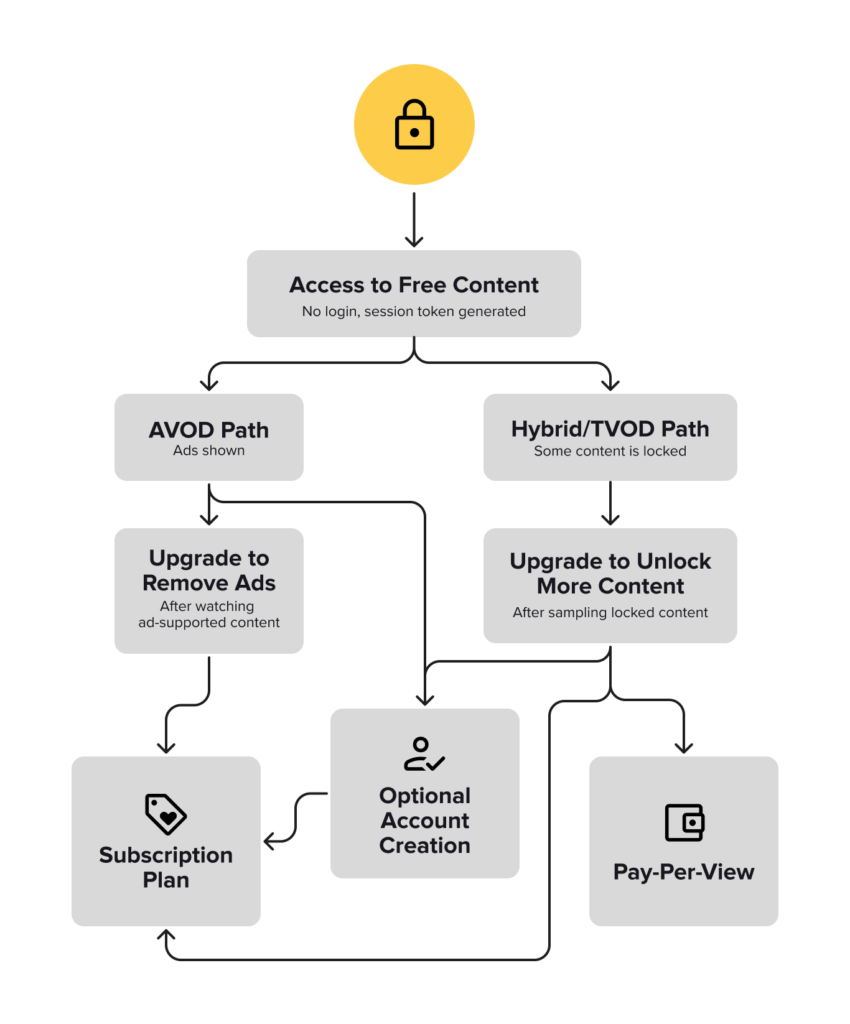
Not every viewer is ready to register. Requiring sign-up upfront can create friction that turns potential viewers away. This is especially true for ad-supported platforms (AVOD). That’s why we’ve introduced Anonymous Viewing – also known as guest access or no-login streaming – designed to let users stream free content instantly, no account needed.
It’s a seamless way to expand reach, reduce bounce, and increase organic conversion by letting your content speak for itself. By removing registration barriers, you can also significantly grow your top-of-funnel traffic, boost ad impressions, and gather behavioural insights on new users who otherwise wouldn’t convert.
What is Anonymous Viewing?
The Anonymous User feature allows users to access and stream free content without logging in or creating an account. This kind of no-login streaming or guest access is increasingly common across OTT services looking to optimise the first-time viewer experience. It removes friction and offers immediate access to features typically reserved for registered users.
It’s especially useful for AVOD platforms looking to:
- Offer instant access to free content
- Lower the threshold for new user engagement
- Create hybrid models with both free and paid content paths
- Increase ad revenue by maximising impressions and session starts
- Capture interest from first-time viewers and drive future conversion
Why It Matters for Your OTT Service
- Faster Access = Higher Engagement: Viewers can dive into content immediately – no forms, no friction.
- Perfect for AVOD Models: Let users browse and stream ad-supported content via anonymous viewing or guest access, with zero login requirements.
- Flexible Modes: Choose between full anonymity or hybrid login options based on your business strategy.
- Business Growth: Increase acquisitions, extend session times, and create more monetisation opportunities.
How Anonymous Viewing Works
When Anonymous Viewing is enabled, a unique token is generated for every app session. This token allows the user to:
- Stream free content without an account
- Experience a fast, frictionless entry point
However, any content involving transactions (rentals, subscriptions, etc.) still requires users to log in or sign up.
Depending on how you configure the feature, the app will support two core modes:
- Fully Anonymous Mode
- Login and registration are disabled
- All accessible content is available without account creation
- Ideal for AVOD-first services focused on reach and ad-based revenue
- Hybrid Mode
- Login and registration are optional
- Anonymous users can stream free content
- Logged-in users can access advanced features like purchases and syncing across devices
What the Viewer Sees
- In fully anonymous mode, users launch the app and start watching immediately
- In hybrid mode, users choose between anonymous streaming or logging in to unlock more
- Settings and profile-based features are only available after account creation
This offers maximum flexibility while keeping the user journey seamless and fast.
Supported Devices & Versions
Anonymous Viewing is supported globally across all major platforms. It cannot be toggled on/off per device.
Currently Available On:
- Web (v15.33.0)
- Smart TV (LG, Samsung, Vizio) (v4.9.0)
Coming Soon:
- Android
- iOS
- Android TV
- Apple TV (tvOS)
Give Viewers a Taste Before They Commit
With Anonymous Viewing, also referred to as guest access or no-login streaming, you let content do the talking. It’s ideal for AVOD platforms that want to grow faster, boost watch time, and reduce friction, all while keeping the door open for conversion when users are ready.
Lower the barrier to entry by enabling Anonymous Viewing in your Magine Pro Console. Need help configuring it or exploring the right model for your service? Get in touch with our team. And don’t miss future feature announcements—follow us on LinkedIn for the latest updates.
Smarter, Safer Streaming with the Parental Control Feature Upgrade
Streaming should be safe, seamless and stress-free. Families want peace of mind, and platform operators need confidence in compliance. That’s why we’ve upgraded our parental control feature to make safer, age-appropriate streaming easier to deliver, manage, and trust on every screen.
What’s New with Parental Control?
Our enhanced parental control feature goes beyond PIN prompts. It introduces rating system flexibility, richer content metadata, and more control for both operators and end users.
For OTT operators:
- Enable national rating systems by region
- Add rating levels, advisory reasons, and icons to content
- Stay compliant with regional regulatory frameworks

For end users:
- View content ratings and details like ‘violence’, ‘nudity’, or ‘strong language’ before pressing play
- Set PIN prompts based on specific content ratings
- Manage parental settings easily in their user account

Why Parental Controls Matter for Your OTT Service
- Friction-Free Compliance: Meet age-appropriateness rules with built-in flexibility
- Trust & Transparency: Clear ratings and advisory info build viewer confidence
- Better UX for Families: Parents get the control they want without complexity
How the Parental Control Feature Works
Parental Control is adaptable and easy to configure, whether you’re protecting live content, catch-up, or on-demand video.
Operator setup:
- Enable it in Console > Default Settings > Content > Parental Control
- Choose from flexible logic options:
- Watershed: PINs required for linear content between 22:00–06:00, including catch-up content. Can also be enabled for specific channels by setting “verify age” to yes.
- Around the clock: Ideal for VOD – PIN prompts appear based on age ratings set in metadata.
- Age limit: A global setting that enforces PIN prompts for content at or above a specified PG age.
- Enabled by default: Automatically turns parental control ON for all new users upon registration.
- Optional parental control: Allows end users to enable or disable parental control from their account settings.
- Enable one or more rating systems, and define a fallback system for countries where no rating system is configured. (If no rating level is set for a region, no rating will display for that content.)
- Tag each asset with rating levels and advisory reasons (e.g., “violence”, “language”) via metadata.
User configuration:
Users can manage their own parental control settings directly from their account, allowing them to tailor PIN prompts and content access based on their preferences.
- Set personal PIN prompt thresholds based on rating level
- Receive/reset PINs via email for secure verification
- See rating level and content reasons before watching
- Toggle parental control on/off (if allowed by platform settings)
Available On:
Our enhanced Parental Control feature is available across all Magine Pro applications:
- Web, mobile, Smart TVs, Android TV, tvOS
- VOD (including downloads), Live, Linear, Catchup, and Trailers
Smarter Metadata for Smarter Protection
For the Parental Control feature to work effectively, your content metadata should include the following fields for each asset (e.g., Movie, Episode, Broadcast):
- System: The rating system being applied (e.g. US, Sweden)
- Rating: The specific age or classification level (e.g. PG-13, 18+)
- Reasons: Tags describing why the content received that rating, such as “violence,” “nudity,” or “substance abuse”
Operators can enable multiple rating systems and configure a fallback system for regions without a dedicated rating scheme. This ensures consistent content protection worldwide.
What the Viewer Sees
- Rating level displayed as icons or text on content cards and detail pages
- Rating reasons shown before playback (e.g. “Nudity,” “Violence”)
- PIN prompts are triggered at the appropriate moment based on user or platform-defined thresholds
- Transactional email sent to users for PIN delivery, reset, and verification
- Users can manage settings in their account (if the service allows), including adjusting rating thresholds or disabling parental control, with PIN confirmation required for changes

Put Viewers in Control and Keep Your Platform Compliant
Parental Control protects both your platform and your viewers. With greater flexibility for operators and more clarity for users, it helps you deliver a safer, smarter, and more personalised streaming experience.
Ready to activate Parental Control? You can enable it directly in your Magine Pro Console.
Want to learn more about Parental Control and the other powerful features in our OTT platform? Get in touch. And don’t miss future feature announcements—follow us on LinkedIn for the latest updates.
The Ultimate OTT Glossary: 70+ Streaming Terms You Actually Need to Know
If you’re building or managing an OTT streaming platform, you’ve probably come across terms like ABR, DRM, or CDN. Whether you’re overseeing platform development, monetisation, or the viewer experience, this glossary breaks down the most important OTT acronyms and terms you need to know.
In this article, explore the essential OTT acronyms by category—Delivery & Playback, Security, Monetization, Content Processing, User Experience, Quality & Performance Monitoring and Business Success Metrics—so you can feel confident talking shop, selecting vendors, or just understanding what’s really happening behind the scenes.
Jump to a section:
- Delivery & Playback
- Content Processing
- Security & Rights
- Monetisation & Analytics
- Billing, Access & Support
- User Experience & Front-End
- Quality & Performance Monitoring
- Business Metrics & Success Indicators

Delivery & Playback
OTT – Over-the-Top
Video delivered over the internet, bypassing traditional cable or satellite. The foundation of services like Netflix, Disney+, and niche streaming platforms.
CDN – Content Delivery Network
A global network of servers that cache and deliver content based on user location, minimising latency and buffering.
Edge Server
Part of the CDN, these are servers closest to the viewer’s location, ensuring lightning-fast load times.
Origin Server
The “master copy” of your content lives here before being distributed across the CDN.
DASH – Dynamic Adaptive Streaming over HTTP
A streaming method that adjusts video quality in real-time based on network performance, like ABR (Adaptive Bitrate Streaming).
ABR – Adaptive Bitrate Streaming
Automatically shifts video resolution and quality depending on a user’s bandwidth, ensuring smooth playback.
HLS – HTTP Live Streaming
An adaptive bitrate protocol developed by Apple that breaks the video stream into smaller file chunks for better playback performance.
Latency
The delay between user action (like hitting play) and actual playback. Critical to get right in live streaming.
Buffering
Temporary loading interruptions—often the result of high latency or poor network conditions. No one wants to see the spinning wheel of doom.
CMAF – Common Media Application Format
A standardised format that simplifies the delivery of streaming media across different devices, reducing the need for multiple versions of the same content.
 Content Processing
 Content Processing
Transcoding
The process of converting a video from one format or resolution to another to ensure compatibility across platforms.
Encoding
Compressing raw video data into a digital format suitable for efficient storage and streaming.
Codec
A device or program that compresses (encodes) and decompresses (decodes) video or audio data. Examples include H.264, H.265, and AV1.
Bitrate
The amount of data transferred per second in a video stream. Higher bitrates generally mean better quality but require more bandwidth.
Frame Rate
The number of frames displayed per second (fps) in a video. Higher frame rates provide smoother motion.
HDR – High Dynamic Range
A video technology that expands the contrast and color range for more lifelike and vivid images.
SDR – Standard Dynamic Range
A traditional video standard with a more limited range of colors and contrast compared to HDR.
Resolution
The number of pixels in a video image (e.g., 720p, 1080p, 4K). Higher resolutions provide clearer images.
Rendition
A version of a video at a specific resolution or bitrate, used in adaptive bitrate streaming.
VMAF – Video Multi-Method Assessment Fusion
A quality metric developed by Netflix that combines multiple quality indicators to assess perceived video quality.
 Security & Rights
 Security & Rights
DRM – Digital Rights Management
Technologies used to prevent unauthorized copying, sharing, or playback of digital video content.
Tokenisation
The generation of time-limited, encrypted access tokens to control user access to video streams.
Geo-blocking
The restriction of content availability based on a user’s geographical location, often due to licensing agreements.
 Monetization & Analytics
 Monetization & Analytics
SVOD / AVOD / TVOD
- SVOD: Subscription-based (e.g. Netflix)
- AVOD: Ad-supported (e.g. YouTube)
- TVOD: Pay-per-view (e.g. Prime rentals)
VOD – Video on Demand
Content that users can watch at any time, as opposed to a scheduled broadcast.
PPV – Pay-Per-View
Users pay a one-time fee to watch specific content, often used for live events.
EST – Electronic Sell-Through
Users purchase and download content to own permanently.
HVOD – Hybrid Video on Demand
A model combining elements of subscription and ad-supported content.
HYBRID
DAI – Dynamic Ad Insertion
The real-time insertion of video ads into a stream, tailored to individual viewers.
CSAI – Client-Side Ad Insertion
Ads are requested and inserted by the user’s device during playback.
SSAI – Server-Side Ad Insertion
Ads are stitched directly into the video stream before delivery, creating a smoother viewing experience.
SSP – Supply-Side Platform
A platform that allows publishers to manage and sell their video ad inventory.
DSP – Demand-Side Platform
Used by advertisers to buy video ad space across multiple sources through automation.
DMP – Data Management Platform
Collects, organises, and analyses user data to support targeted advertising.
CPM – Cost Per Mille (Thousand Impressions)
A pricing model that charges advertisers per 1,000 ad impressions.
IAB – Interactive Advertising Bureau
An industry organisation that sets standards for digital advertising, including video formats.
CMP – Consent Management Platform
Manages user permissions and privacy preferences to ensure GDPR and CCPA compliance.
TCF – Transparency and Consent Framework
A standard framework for communicating and managing user consent in digital advertising.
IFA – Identifier for Advertisers
A unique ID assigned to devices for ad tracking and targeting purposes.
VAST – Video Ad Serving Template
A specification that standardises communication between ad servers and video players.
VMAP – Video Multiple Ad Playlist
Defines when ads should play during a video (pre-roll, mid-roll, post-roll).
VPAID – Video Player-Ad Interface Definition
Enables interactive video ads but is being phased out in favor of SIMID.
SIMID – Secure Interactive Media Interface Definition
A secure standard for interactive ads, replacing VPAID.
ADR – Average Daily Revenue
The average revenue generated per day. Useful for forecasting and tracking platform performance.
MAU / DAU – Monthly / Daily Active Users
Tracks viewer engagement. A high DAU/MAU ratio indicates strong stickiness.
ARPU – Average Revenue Per User
Measures how much you’re earning from each user on average.
 Billing, Access & Support
 Billing, Access & Support
CRM – Customer Relationship Management
A system for managing subscriber data, preferences, and interactions to support retention.
CMS – Content Management System
Enables management of video files, metadata, categories, and publishing workflows.
Entitlement System
Controls which content users can access based on their subscription level or purchases.
Billing Engine
Handles the processing of payments, renewals, refunds, and invoicing.
SMS – Subscriber Management System
Manages authentication, account settings, and access permissions.
Cloud DVR (cDVR)
Allows users to record and store live content in the cloud for later viewing.
nPVR – Network Personal Video Recorder
A server-based recording system enabling viewers to record programs without hardware at home.
 User Experience & Front-End
 User Experience & Front-End
UI / UX – User Interface / User Experience
UI refers to the design and layout of the service, while UX is the overall user journey and satisfaction.
EPG – Electronic Program Guide
Displays scheduled or available content in a visual, navigable format—especially for live TV.
CTA – Call to Action
Prompts such as “Subscribe Now” or “Watch Free” that encourage user engagement.
SEO – Search Engine Optimization
Optimizing platform and content metadata to improve search engine visibility.
Play Rate
The percentage of visitors who click play after landing on a video page.
Quality & Performance Monitoring
 Quality & Performance Monitoring
QoS – Quality of Service
A technical measure of service performance, including delivery speed, uptime, and reliability.
QoE – Quality of Experience
How the user perceives the playback quality, buffering, video resolution, and responsiveness.
Engagement Rate
The frequency and intensity of viewer interactions with content, such as likes, shares, or time watched.
Average Watch Time
The average time viewers spend watching a single piece of content.
Completion Rate
The percentage of users who finish a video from start to end.
Buffering Ratio
The proportion of time spent buffering versus time spent watching.
Peak Concurrent Users
The highest number of users simultaneously streaming content on your platform.
 Business Metrics & Success Indicators
 Business Metrics & Success Indicators
NPS – Net Promoter Score
A metric measuring user loyalty and satisfaction based on likelihood to recommend your service.
CAC – Customer Acquisition Cost
The total marketing and sales cost required to acquire a single paying subscriber.
CLTV – Customer Lifetime Value
The predicted total revenue a subscriber will bring throughout their time with your platform.
Churn Rate
The percentage of subscribers who cancel their service during a specific time frame.
MRR / ARR – Monthly / Annual Recurring Revenue
Metrics that track predictable revenue from subscriptions.
Ready to Simplify the Streaming Stack?
Whether you’re just getting started with your first VOD service or scaling an established streaming platform, understanding the building blocks—from CDNs to DRMs—is key to long-term success.
Ready to put this knowledge into action and simplify your entire streaming stack? Talk to our team and discover how we can help you build a seamless, scalable, world-class streaming experience.